Keep close track of staff overtime

Ensure extra effort works in your favour

Our overtime management is part of WhosOffice’s back office and employee management software. Designed and developed to make your overtime management easier than ever, WhosOffice increases productivity and takes all of the hard work out of your otherwise lengthy processes, allowing you to run all your people management, including employee scheduling requirements through one application. Get in touch with our helpful team to find out more, or arrange a one-on-one demo right here.

Encouraging overtime is a great way to fill staffing gaps while helping employees increase their earnings. But managed ineffectively, it can really drain your profit margin.

WhosOffice empowers companies to keep close track of overtime hours. Use our platform to set rules on the number of extra shifts that people can work, and whether they are reimbursed or accrue time off in lieu.


Overtime that works for everyone

Assigning overtime isn’t always a ‘one size fits all’ process. WhosOffice allows you to customise the types of overtime that you offer, and who is entitled to work extra shifts.

  • Choose who can work paid overtime and who receives TOIL
  • Create set processes for approving overtime requests
  • Send alerts to employees when additional shifts become available
  • Align shift data with payroll for accurate overtime payments

Any time off in lieu accrued can be automatically added to employees’ allowances using our built-in leave management tool.

Overtime rules and restrictions
Structure - without the rules

By switching to WhosOffice shift planning software, you can create as many different overtime types as you need, specifying rates for each category. You’re not forced to make overtime fit a pre-existing set of rules.

When you’ve created your structure, set how each type of overtime is reimbursed – choosing payment or time off in lieu – and which groups of staff are entitled to work.

Easy approvals and reporting

WhosOffice is designed to make overtime transparent and easy to manage. Develop your own sign-off structure for any overtime requests, with multi-approver options available. By creating a clear process, you’ll be confident that data is correct when it’s sent through to payroll. 

You can also use WhosOffice reporting tools to review all overtime worked across a certain team or period of time, to see who is free when additional shifts need covering. 
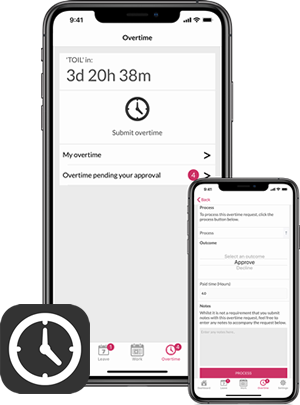
Easy overtime approvals from our dedicated apps

Overtime Management FAQs


What is overtime management software?
Overtime management software helps businesses record, approve and monitor employee overtime, ensuring additional hours are tracked accurately, payroll remains correct and staffing costs stay under control.

How does WhosOffice manage employee overtime?
WhosOffice enables employees to submit overtime requests, managers to approve or decline them through configurable approval workflows, and organisations to report on overtime worked across teams and departments.

Can WhosOffice track Time Off In Lieu (TOIL)?
Yes. WhosOffice supports Time Off In Lieu (TOIL), allowing businesses to reward overtime with additional leave instead of payment. Approved TOIL can automatically update an employee's leave entitlement.

Can I create different overtime types?
Yes. WhosOffice allows you to create multiple overtime categories, each with its own reimbursement method, approval process and eligibility rules, giving you complete flexibility over how overtime is managed.

Can different employees have different overtime rules?
Yes. Overtime policies can be assigned to specific employee groups, allowing certain staff to receive paid overtime while others accrue Time Off In Lieu or follow different approval requirements.

Does WhosOffice support overtime approval workflows?
Yes. Managers can configure approval workflows, including multiple approvers where required, helping ensure overtime is authorised before being processed for payroll or TOIL.

Can employees be notified when overtime becomes available?
Yes. WhosOffice can notify eligible employees when additional shifts become available, helping organisations fill staffing gaps more quickly.

Can overtime information be shared with payroll?
Yes. Approved overtime records can be reported and exported, providing payroll teams with accurate information for processing employee payments.

Does WhosOffice provide overtime reports?
Yes. Built-in reporting allows managers to analyse overtime across teams, departments or date ranges, helping identify trends, staffing requirements and overtime costs.

Can overtime be linked with employee schedules?
Yes. Overtime works alongside WhosOffice shift planning, making it easy to identify available employees, cover staffing shortages and maintain appropriate workforce levels.

Can overtime be managed from mobile devices?
Yes. Employees and managers can submit, review and approve overtime requests using the WhosOffice mobile apps for iOS and Android.

Does WhosOffice help reduce overtime costs?
Yes. By providing visibility of overtime, configurable rules, approval workflows and reporting, WhosOffice helps businesses monitor additional working hours and reduce unnecessary overtime expenditure.

Can WhosOffice improve compliance with company overtime policies?
Yes. Businesses can define who is eligible for overtime, how it is rewarded, when approvals are required and which employees can work additional hours, helping ensure company policies are consistently applied.

Who is WhosOffice overtime management suitable for?
WhosOffice overtime management is suitable for organisations of all sizes that need to manage additional working hours, including businesses operating shift patterns in sectors such as healthcare, hospitality, manufacturing, logistics and retail.

Can I try the WhosOffice overtime management software before purchasing?
Yes. WhosOffice offers a free trial, allowing businesses to explore overtime management alongside the platform's complete workforce scheduling and employee management features before subscribing.